Starting a new text analysis
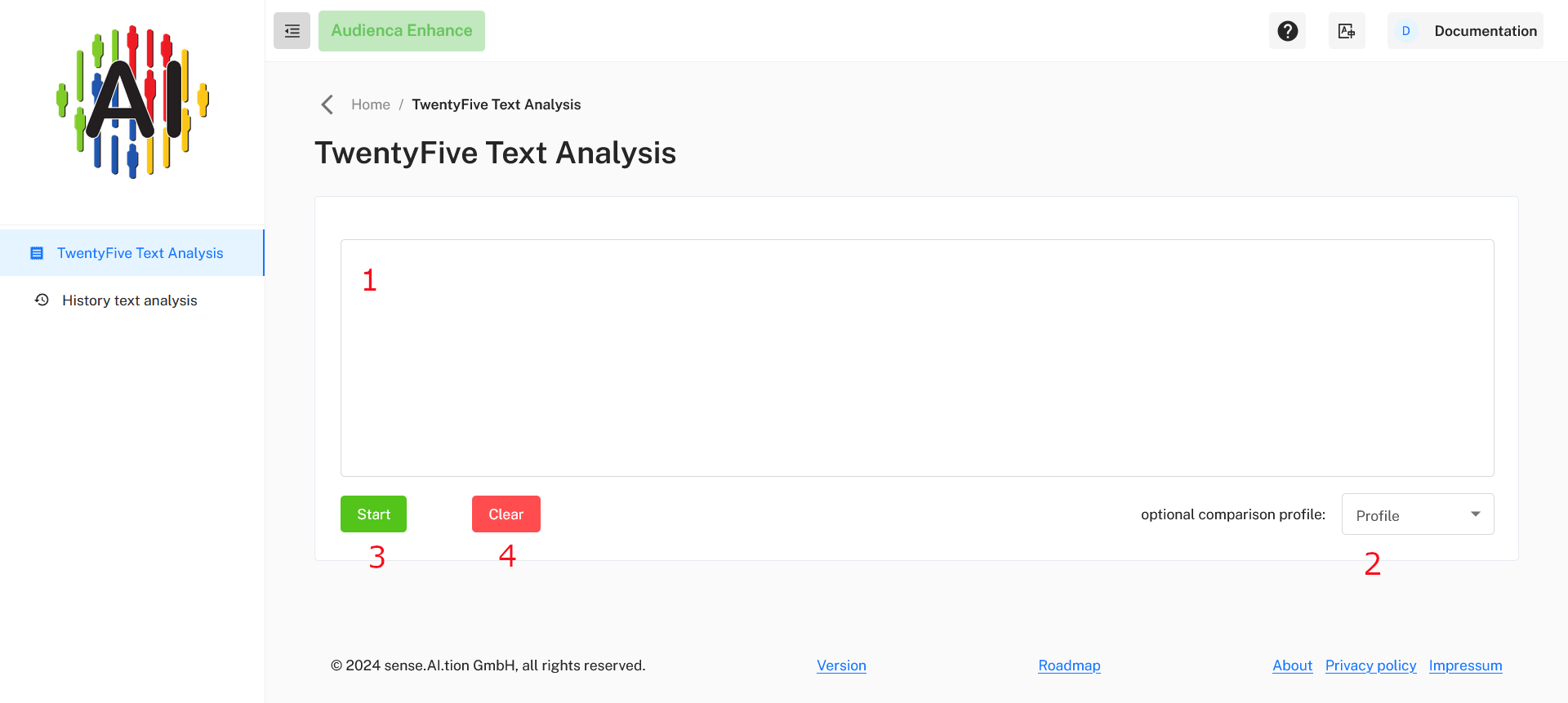
Here you can analyze text data efficiently. Below is a description of each section and button on this page:
1. Text Input Field
- Purpose: Enter the text you wish to analyze in this field.
- Instructions: Simply click inside the box and type or paste your text. This can be any type of text you want to examine, such as a paragraph, sentence, or even keywords.
2. Optional Comparison Profile Dropdown
- Purpose: Select an optional profile to compare your text with pre-defined profiles.
- Instructions: Click on the dropdown menu labeled “Profile” to see the list of available comparison profiles. Choose one if you’d like to analyze the text against a specific profile. If not, leave this field as it is.
3. Start Button
- Purpose: Initiate the text analysis process.
- Instructions: After entering your text, click the green Start button to begin the analysis. The system will process your text and display the analysis results.
4. Delete Button
- Purpose: Clear the text input field.
- Instructions: If you wish to remove the current text, click the red Delete button. This will reset the input field, allowing you to enter new text for analysis.
Use Audienca Enhance
You can order the product Audienca Enhance (or request a test account) at Audienca Enhance