Settings
Jump to Section
Audio settings
-
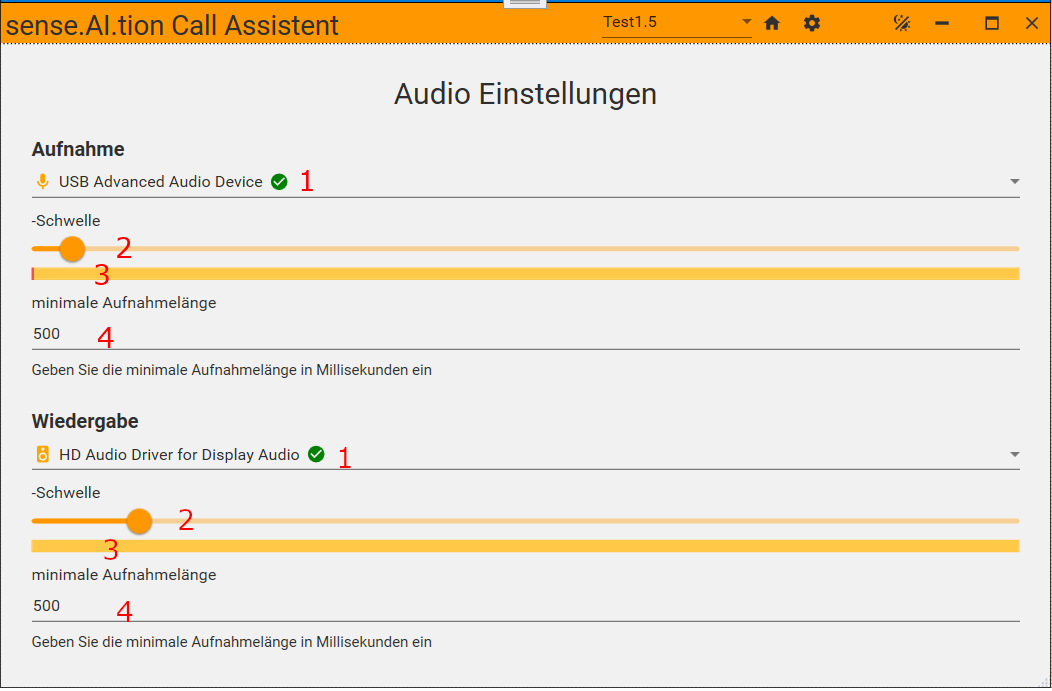
Audio Device Selection: Use the dropdown
(1)to change the Input/Output device. A green checkmark indicates that the device is functioning correctly. -
Threshold Slider:
(2)Allows the user to set the audio threshold level for recording or playback. Moving the slider to the right increases the threshold, while moving it to the left decreases it. -
Audio level:
(3)Shows the current value of the Audiolevel. It turns green when the Audiolevel is above the threshold. -
Minimum Length:
(4)Specifies the minimum length of time (in milliseconds) for which audio must be recorded before processed.