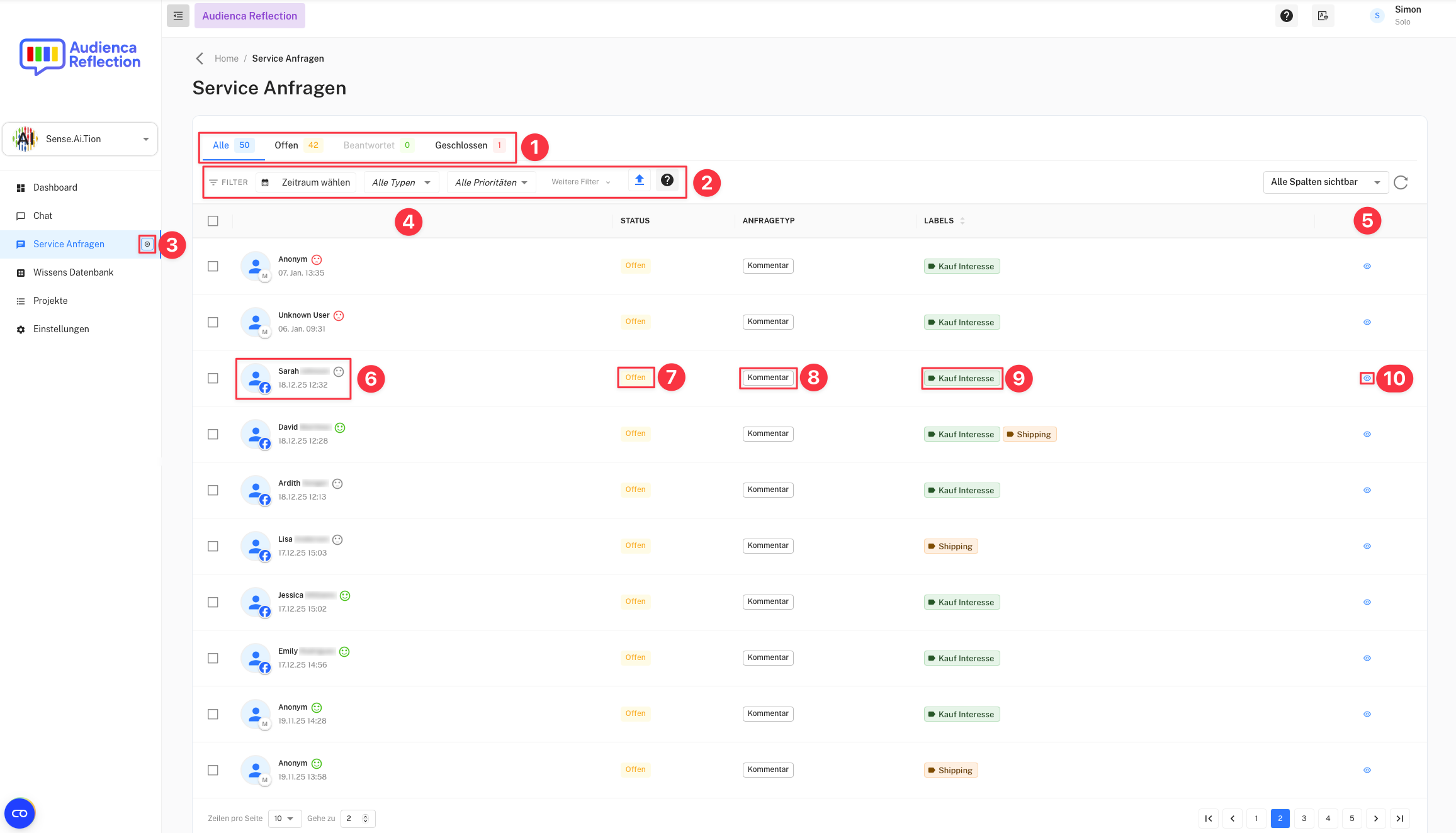
Overview of service requests
-
Tabs
- Filter requests by status:
- All: Shows all requests.
- Open: Pending requests.
- Answered: Resolved requests.
- Closed: Archived requests.
- Filter requests by status:
-
Filter Options
- Allows filtering by time range, request type, and priority.
-
Create New Manual Service Request
- Create a new manual request.
-
Request List Header
- The list is divided into user, status, request type, labels, and actions.
-
Actions Column
- Available actions for each request, e.g., “View request”.
-
Username
- Shows the name of the user who submitted the request.
-
Status
- Current status of the request: Open, Answered, or Closed.
-
Request Type
- Categorizes the type of request (e.g., comment, support, review).
-
Labels
- Displays relevant tags for a request (e.g., “Purchase interest”).
-
View Icon in Actions Column
- Click to view and process the request in detail.
Use Audienca Reflection
You can order the product Audienca Reflection (or request a test account) at Audienca Reflection