Overview of old text analysis
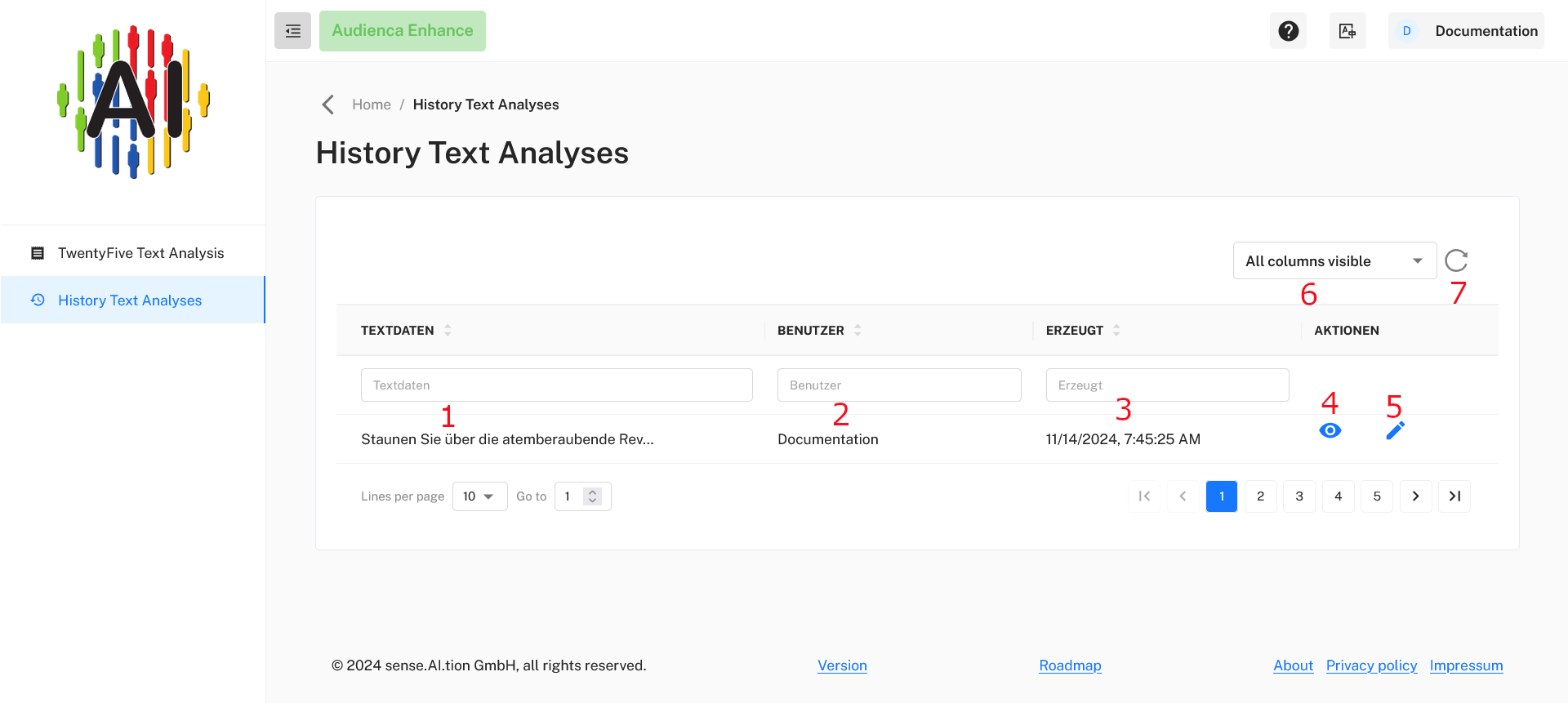
This page provides an overview of past text analyses. Here’s a breakdown of each section and button on the page:
1. Text Data Filter (Textdaten)
- Purpose: Search through past analyses by text content.
- Instructions: Enter keywords or phrases in the “Textdaten” field to filter results based on text data. Only rows containing your input will be displayed.
2. User Filter (Benutzer)
- Purpose: Filter analyses based on the user who performed them.
- Instructions: Type a username in the “Benutzer” field to display only analyses conducted by that user.
3. Created Filter (Erzeugt)
- Purpose: Filter by creation date and time.
- Instructions: Enter a specific date or time in the “Erzeugt” field to filter analyses performed at that time.
4. View Icon (Eye Symbol)
- Purpose: View the full text analysis details.
- Instructions: Click on the eye icon to open a detailed view of the selected analysis.
5. Edit Icon (Pencil Symbol)
- Purpose: Edit the analysis entry.
- Instructions: Click the pencil icon to modify or update the selected text analysis details.
6. Column Visibility (Alle Spalten sichtbar)
- Purpose: Customize visible columns in the table.
- Instructions: Click on the dropdown to show or hide specific columns according to your preference.
7. Refresh Button
- Purpose: Refresh the table to view the latest analyses.
- Instructions: Click the circular arrow to reload the table with any new or updated entries.
Use Audienca Enhance
You can order the product Audienca Enhance (or request a test account) at Audienca Enhance